1. Overview
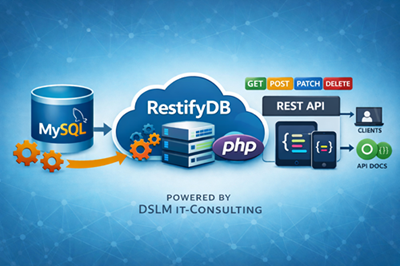
This document describes the architecture, behavior, and integration details of the REST service. It is intended for developers who integrate their applications with the service and assumes familiarity with SQL databases, stored procedures, and basic REST principles. The REST service exposes database tables as HTTP endpoints in a controlled and secure manner. All business logic and validation is located inside stored procedures, ensuring:
centralized business rules
consistent validation
full transactional control
multi-error reporting in a single request
The REST layer (index.php) acts as a thin gateway that:
authenticates requests
authorizes API keys
maps input parameters to stored procedure arguments
executes database logic
formats results or error sets into JSON
The system is designed for extensibility and adheres to the principle:
“Database enforces business rules. API gateway enforces authentication & authorization.”
2. Routing Model
Each REST endpoint is defined in the `api_routes` table. Endpoints are dynamic, allowing expansion without modifying the PHP backend. Each REST endpoint corresponds to an entry in the database table:
api_routes
| Column | Description |
|---|---|
| resource | Logical entity name (e.g. customers) |
| http_method | GET, POST, PATCH, DELETE |
| requires_id | 0 = collection-level, 1 = item-level |
| sql_template | SQL statement or stored procedure call |
| is_active | Enables/disables the route |
Example:
| resource | http_method | requires_id | sql_template |
|---|---|---|---|
| customers | POST | 0 | CALL sp_customers_create(...) |
| customers | GET | 1 | CALL sp_customers_get_one(...) |
This design allows new endpoints to be introduced without modifying the PHP gateway.
3. Parameter Mapping
Parameter mapping is configured via the `api_route_params` table. Parameters can be sourced from request body, query parameters, path variables, or constant values.
Parameter mapping is defined in:
api_route_params
Each stored procedure parameter is derived from:
request body
query string
URL path (/customers/{id})
a constant value
This enables dynamic request-to-procedure mapping without changing application code.
Example:
| param_name | source | source_key | const_value |
|---|---|---|---|
| p_id | path_id | (null) | (null) |
| p_email | body | (null) | |
| p_name | body | name | (null) |
4. Validation & Business Logic
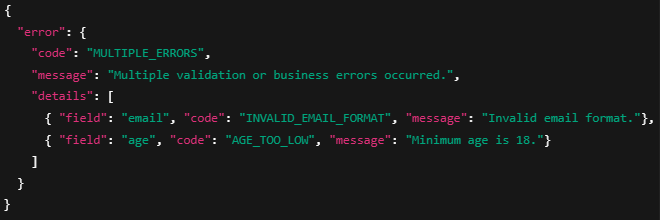
Stored procedures perform all validation logic. Errors are collected into a temporary table `validation_errors`, allowing multiple validation failures to be reported in a single response.
The API gateway detects error result sets and converts them into standardized JSON error responses.
Unlike typical REST frameworks, this service performs no validation in PHP. All validation occurs inside stored procedures using a consistent pattern: 4.1 Multi-Error Validation
Each stored procedure:
Creates a temporary table `validation_errors`
Inserts multiple rows if several validation failures occur during a single request
Returns the error table as the first result set if any errors exist
Continues normal processing only if the error count is zero
Error table schema:
| Column | Description |
|---|---|
| field | Associated field name |
| code | Technical error code |
| message | Human-readable error |
| http_status | HTTP status to return |
Example output:
This architectural choice provides several key advantages:
Centralized Business Logic All rules - required fields, formats, ranges, uniqueness checks, and domain-specific validations - are located in one authoritative layer, the database. This eliminates inconsistencies that occur when logic is duplicated across application layers.
Transaction-Safe and Atomic Because validation happens inside the same transactional context as the write operation:
no partial updates occur
race conditions are avoided
complex interdependent rules can be enforced reliably
This ensures strong data integrity, even under heavy parallel load.
Multi-Error Reporting in a Single Request The database collects all validation errors at once using a standardized temporary table, allowing the API to return multiple issues in a single structured response. Many REST frameworks return only the first validation error; our model provides a fuller diagnostic picture for the client.
Better Performance for Data-Driven Applications Performing validation inside the database avoids unnecessary network round trips and allows MySQL/MariaDB’s optimized query engine to perform checks efficiently. This is especially beneficial for:
high-frequency write operations
batch imports
complex validation chains
Clear Separation of Responsibilities
The architecture follows a clean, maintainable structure:
Database layer: business rules, validation, integrity
API gateway: authentication, authorization, routing, JSON formatting
Client/application: presentation and interaction logic
This separation ensures long-term maintainability and reduces error potential.
4.2 Types of Rules Typically Implemented in Stored Procedures
Examples include:
required fields
value ranges (e.g. age >= 18)
email format validation via REGEXP
maximum string lengths
uniqueness constraints (e.g. email must be unique)
domain-specific business rules (e.g. customer younger than 21 cannot be deleted)
5. Authentication Model
The service supports Bearer Token authentication. Tokens are stored in the `api_keys` table. Global permissions define which HTTP methods a key may use at a system-wide level.
Example:

Tokens are stored in:
api_keys
| Column | Meaning |
|---|---|
| api_key | Token value |
| allow_get | Global permission for GET |
| allow_post | Global permission for POST |
| allow_patch | Global permission for PATCH |
| allow_delete | Global permission for DELETE |
| is_active | Enable/disable token |
These global permissions define what a token can do across the system, but they are not sufficient on their own.
6. Authorization Model (Resource-Level Permission System)
This is the most important part of the security architecture.
The system enforces a strict Default Deny strategy: If no permission record exists for a resource, the API key cannot access it.
Global method permissions alone (e.g. GET allowed for all tables) are not granular enough. Therefore, we introduce resource-level permissions:
Table: api_key_resource_permissions
| Column | Description |
|---|---|
| api_key_id | Reference to api_keys.id |
| resource | Resource name (matching api_routes.resource) |
| allow_get | Whether GET on this resource is permitted |
| allow_post | Whether POST on this resource is permitted |
| allow_patch | Whether PATCH on this resource is permitted |
| allow_delete | Whether DELETE on this resource is permitted |
6.1 Permission Decision Logic
The system checks permissions in this order:
Step 1 — Is API key valid?
If not → HTTP 401 Unauthorized.
Step 2 — Is the method allowed globally (from api_keys)?
If not → HTTP 403 Forbidden.
Step 3 — Does a api_key_resource_permissions entry exist for this key + resource?
If no entry exists → access is denied (Default Deny).
Step 4 — Does the entry permit this HTTP method?
If not → HTTP 403 Forbidden.
Only if all conditions pass is the stored procedure executed.
7. Default Deny Strategy
Default Deny ensures that new resources are never exposed unintentionally. Access must be explicitly provisioned per key and per resource. Therefore this REST service follows a Default Deny security model:
If a resource-specific permission entry does not exist, access is denied — even if global method permission is granted.
Benefits:
No accidental exposure of new resources
API keys must be explicitly provisioned
Centralized permission management
Predictable and safe behavior
Example:
If you add a new resource orders, then:
No API key can access orders automatically
You must create corresponding rows in api_key_resource_permissions
8. Error Handling
Stored procedures return structured error sets. These follow a consistent schema including fields, error codes, human-readable messages, and HTTP status codes.
Error scenarios include validation failures, business rule violations, authentication problems, and missing routes.
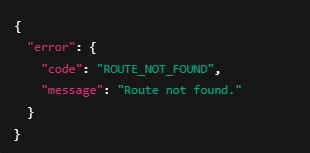
8.1 Validation / Business Errors (from stored procedures) Returned as JSON: 8.2 Route Not Found
Returned when no matching entry in api_routes exists: 8.3 Permission Errors
Missing resource entry → 403 Forbidden
Method not allowed → 403 Forbidden
Invalid token → 401 Unauthorized
9. Response Model
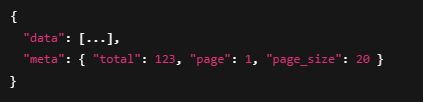
Stored procedures may return single datasets, multiple datasets (such as paginated results), or validation error datasets. The API gateway interprets each type appropriately.
Success responses follow predictable JSON formats for easy client-side integration. Stored procedures may return:
Single result set → returned as JSON object or array
Two result sets (data + pagination meta) → returned as:
Error result set (validation_errors) → converted automatically into unified error JSON
10. Concurrency Model
Temporary validation tables are connection-local. Since each HTTP request uses a new database connection, concurrent execution is isolated and safe.
parallel requests do not interfere
temporary tables are isolated per request
stored procedures remain thread-safe
11. Summary
Business logic lives in stored procedures, ensuring centralized enforcement.
The PHP gateway provides routing, authentication, authorization, and output formatting.
Resource-level permissions provide secure and granular access control.
The design supports extensibility, predictability, and strong operational safety.
| Component | Responsibility |
|---|---|
| Stored Procedures | All validation, business logic, multi-error reporting |
| PHP Gateway (index.php) | Authentication, authorization, routing, JSON formatting |
| Database Tables | Dynamic routing, parameter mapping, permissions |
| api_key_resource_permissions | Fine-grained resource-level access control (Default Deny) |
| api_keys | Global method restrictions |
This architecture ensures:
strong consistency
centralization of business rules
minimal attack surface
high extensibility
predictable security behavior
12. Admin Portal
RestifyDB includes an embedded admin portal for managing routes, API keys, and stored-procedure templates directly from the browser. The portal is available at admin.php and requires an authenticated session.
12.1 Access and login
Authentication is implemented via PHP session. The admin login validates against the API key record with id=1 (api_keys.id = 1) which is always the ADMIN key! To restrict access, ensure the admin API key is strong, keep apiAuthEnabled enabled for the API, and serve the portal over HTTPS.
12.2 API Routes management
The API Routes screen lists all REST endpoints configured in the database (table api_routes). Each route maps a resource + HTTP method to a SQL template (typically a stored-procedure call). Use Select to load the route's parameter mapping; use Edit to adjust metadata and the SQL template; use Delete to deactivate/remove a route.
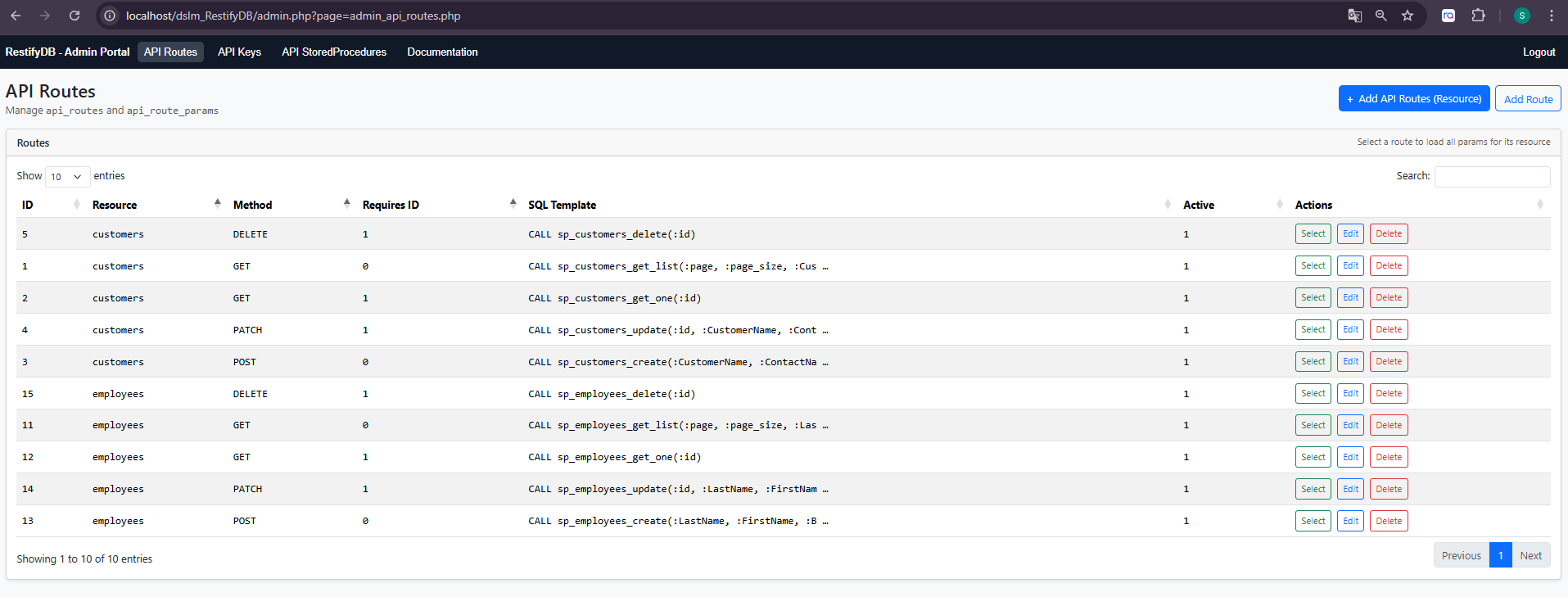
Figure 1 – Admin Portal: API Routes (resource, method, requires_id, SQL template).
12.3 API Key administration and permissions
API keys are bearer tokens stored in api_keys. Permissions are evaluated in two layers: (1) global method toggles on the key (allow_get/allow_post/allow_patch/allow_delete), and (2) resource-level permissions in api_key_resource_permissions. A missing resource permission row results in Default Deny (HTTP 403).
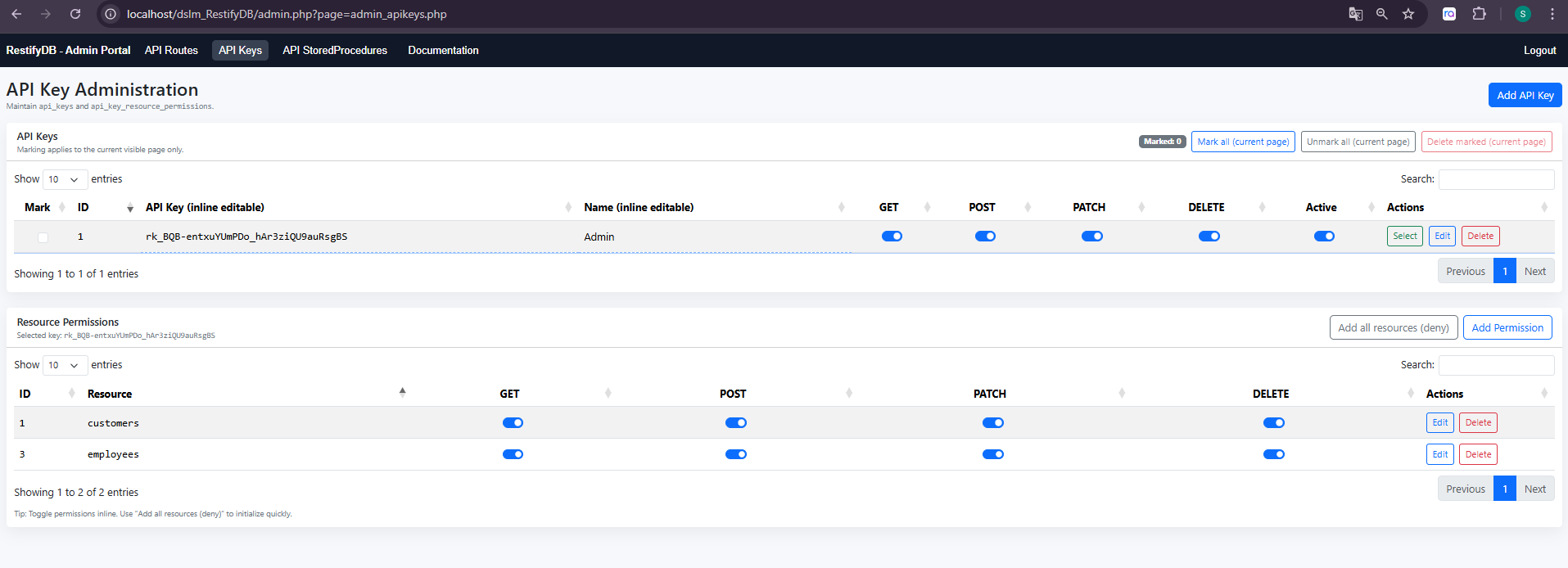
Figure 2 – Admin Portal: API Keys (global method toggles) and resource-level permissions.
12.4 Stored procedure templates and generation
The Stored Procedures screen shows the expected stored procedures for each configured route. If a procedure is missing in the database, the portal can generate a baseline template. Templates follow the RestifyDB pattern of collecting validation failures into a temporary validation_errors table and returning it as the first result set.
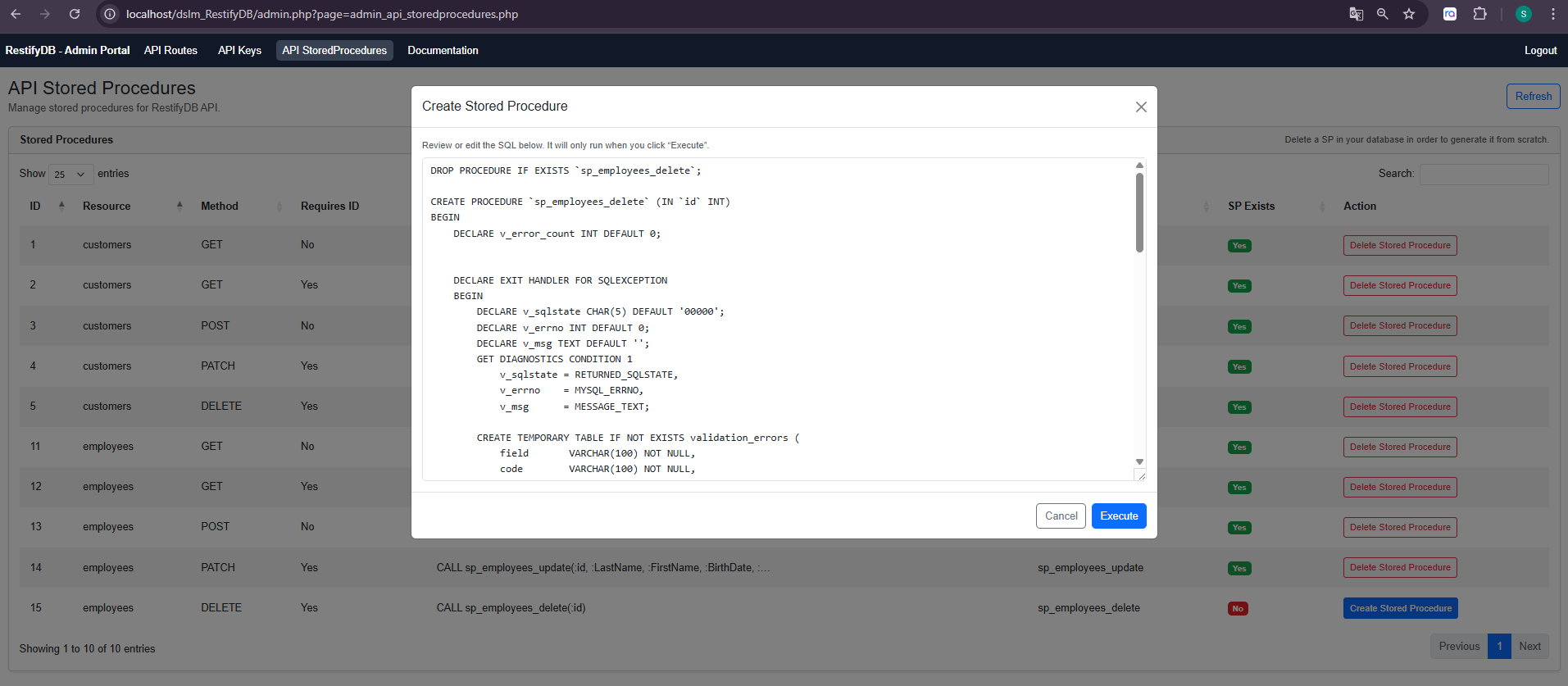
Figure 3 – Admin Portal: Create Stored Procedure dialog (generated SQL template).
13. Configuration and Deployment Notes
This section summarizes the project-level configuration points that impact runtime behavior and deployment.
13.1 Database connection (config.php)
The REST gateway (index.php), OpenAPI generator (openapi.php), and admin portal all use the DSN, username, and password configured in config.php. The project includes following SQL scripts:
/sql/dslm_RestifyDB.sql This is a MySQL database script to add RestifyDB tables to your existing database. You need to add these tables to your database in order to run RestifyDB REST-Service.
/sql/northwind.sql This is a MySQL sample database of the popular “Northwind” database from Microsoft. Feel free to use if you want to test our solution with sample data.
13.2 API authentication toggle
Authentication can be enabled/disabled via $apiAuthEnabled in config.php. When enabled, requests must include an Authorization header using the Bearer scheme.
13.3 Exposing database error details
For troubleshooting and local development, $exposeDbErrors can be set to true to expose database constraint error messages. For production deployments, set this to false to reduce information leakage.
13.4 Apache Authorization header forwarding (.htaccess)
If running behind Apache with mod_php or PHP-FPM, ensure the Authorization header is forwarded to PHP. The provided .htaccess includes a SetEnvIfNoCase rule that maps Authorization to HTTP_AUTHORIZATION, which index.php reads when extracting the bearer token.
14. Interactive API Documentation (OpenAPI + Swagger UI)
RestifyDB publishes an OpenAPI 3 specification generated from the api_routes configuration. The OpenAPI JSON is served by openapi.php, and the interactive Swagger UI is served by swagger.php.
In Swagger UI, use Authorize to provide a bearer token (an API key from api_keys). Once authorized, you can execute requests directly from the browser against the configured server base URL.
Example:
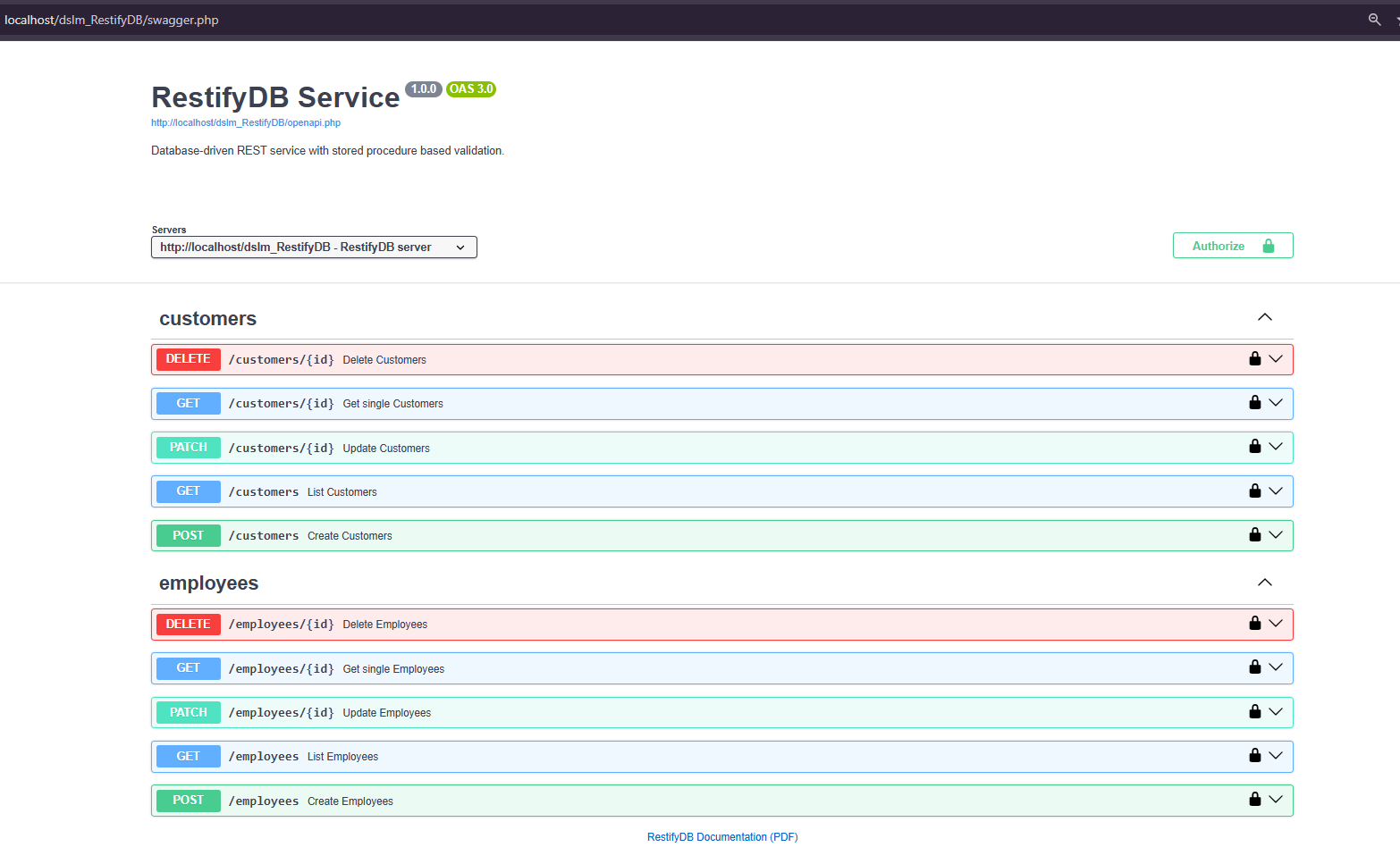
Figure 4 – Swagger UI: endpoints grouped by resource and secured via bearer token.